Samsung My Files screenshot 0Samsung My Files screenshot 1Samsung My Files screenshot 2
Samsung My Files Icon

Samsung My Files

Samsung Electronics Co., Ltd.
Trustable Ranking IconTrusted
Downloads2B+
Rating4.06
Size21MB
AgeAge ratingPEGI-3
Android Version11+
Download logoDownloadwith Aptoide
DetailsReviewsVersionsInfo

Description of Samsung My Files

Samsung My Files is a file management application available for the Android platform. This app allows users to efficiently manage files stored on their smartphones, SD cards, and USB drives. Users can download Samsung My Files to enhance their file organization and accessibility.


The app offers a range of functionalities aimed at simplifying the file management process. Users can browse and organize their files through a straightforward interface. This includes the ability to create folders, move files to different locations, copy documents, share files with others, and compress or decompress various file types. Detailed information about each file can be accessed easily, providing clarity on file size, type, and modification date.


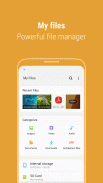
To help users keep track of their recent activities, the app includes a Recent Files list. This feature displays files that have been downloaded, opened, or run recently, making it convenient for users to revisit important documents or images without searching through multiple folders. Additionally, the Categories list organizes files by type, such as downloaded items, documents, images, audio files, videos, and installation files, allowing for quick access and efficient navigation.


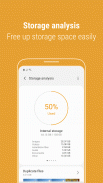
Samsung My Files also features a storage analysis function that enables users to assess their storage usage. By tapping the "Storage Analysis" button on the main screen, users can identify which files are taking up space and take action to free up storage if needed. This can be particularly useful for those who may be running low on space or who want to keep their device organized.


For those who prefer a customized view, the app allows users to hide unused storage space from the main screen via the "Edit My Files home" option. This functionality can streamline the user interface, offering a more personalized experience. Users can also switch to a Listview mode to view long file names without them being truncated by ellipses, ensuring that all relevant information is visible at a glance.


Cloud services are integrated into Samsung My Files, allowing users to manage files stored in popular cloud platforms such as Google Drive and OneDrive. This integration makes it easier for users to access their files from various locations and ensures that important documents are always within reach, regardless of device.


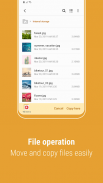
The app supports various file operations, including the ability to delete unwanted files and folders. This means users can efficiently manage their digital space without needing additional tools. The straightforward design of the app makes it accessible to a wide range of users, whether they are looking for basic file management capabilities or more advanced features.


Samsung My Files also includes folder and file shortcuts. Users can create these shortcuts to display specific folders or files on the device's home screen or the My Files main screen. This feature enhances accessibility, allowing for quick navigation to frequently used files without unnecessary searching.


As a file management tool, Samsung My Files is designed to cater to diverse user needs. It supports various file types, ensuring that users can manage everything from simple documents to multimedia files with ease. The app's user-friendly interface reduces the learning curve, making it suitable for both novice and experienced users alike.


The ability to compress and decompress files is another significant feature within the app. This functionality allows users to manage large files more efficiently, saving storage space and making file sharing easier. By compressing files, users can reduce their size before sending them, which can be particularly helpful when dealing with large media files.


In addition to its practical features, Samsung My Files prioritizes user security. The app provides a secure environment for managing sensitive files, ensuring that users can handle their documents with confidence. This is particularly important for users who may store private information on their devices.


Another aspect worth noting is the app's ability to provide detailed file information. Users can view metadata associated with their files, such as creation dates and file sizes, which is useful for organizing and managing files effectively.


Samsung My Files stands out as a comprehensive tool for file management on Android devices. Its combination of user-friendly features, cloud integration, and detailed file handling capabilities makes it a valuable app for anyone looking to organize their digital life efficiently. By facilitating both basic and advanced file management tasks, the app serves as an essential resource for users seeking to maintain control over their files and storage space.


With its robust set of features, Samsung My Files offers a practical solution for managing files on Android devices, making it easier for users to stay organized and efficient in their digital activities.

Samsung My Files - Version 15.4.02.3

(05-02-2026)
Other versions

What's new- When searching the internal storage, you can immediately add or delete Favorites while checking the folder route.- When compressing files, you can strengthen the security by entering a password. Compressed files with passwords can also be unzipped.- “Analyze storage” now shows you how much storage is being used by file type on OneDrive/Google Drive.

There are no reviews or ratings yet! To leave the first one please

-
249 Reviews
5
4
3
2
1

Samsung My Files - APK Information

APK Version: 15.4.02.3Package: com.sec.android.app.myfiles
Android compatability: 11+ (Android11)
Developer:Samsung Electronics Co., Ltd.Privacy Policy:http://www.samsung.com/us/common/privacy.htmlPermissions:122
Name: Samsung My FilesSize: 21 MBDownloads: 2BVersion {{version}}: 15.4.02.3Release Date: 2026-02-05 03:14:07Min Screen: SMALLSupported CPU: armeabi-v7a, arm64-v8a
Package ID: com.sec.android.app.myfilesSHA1 Signature: 9C:A5:17:0F:38:19:19:DF:E0:44:6F:CD:AB:18:B1:9A:14:3B:31:63Developer (CN): Samsung CertOrganization (O): Samsung CorporationLocal (L): Suwon CityCountry (C): KRState/City (ST): South Korea

Latest Version of Samsung My Files

15.4.02.3Trust Icon Versions
5/2/2026
2B downloads21 MB Size
Download

Other versions

15.2.04.2Trust Icon Versions
15/10/2025
2B downloads20 MB Size
Download
15.2.03.2Trust Icon Versions
18/9/2025
2B downloads20 MB Size
Download
15.2.02.8Trust Icon Versions
22/5/2025
2B downloads20 MB Size
Download
15.0.04.5Trust Icon Versions
11/4/2024
2B downloads19 MB Size
Download
13.1.03.501Trust Icon Versions
15/6/2025
2B downloads23.5 MB Size
Download
12.2.09.531Trust Icon Versions
21/2/2023
2B downloads14 MB Size
Download
11.5.08.531Trust Icon Versions
31/1/2023
2B downloads12.5 MB Size
Download
5.0.11.2Trust Icon Versions
26/6/2022
2B downloads9.5 MB Size
Download
4.1.94.541Trust Icon Versions
8/10/2021
2B downloads6 MB Size
Download
appcoins-gift
Level Up GamesGet up to 30 % cashback!
More
Aptoide home page
Aptoide is the fastest growing app store and distribution platform in the world. We are a global platform for global talent. Do you want the world?
English
facebook Social Icon
x Social Icon
instagram Social Icon
youtube Social Icon
linkedin Social Icon
tiktok Social Icon
discord Social Icon
©2026 APTOIDE.COM. All rights reserved